
A few days back, a client came to me and told me that he was having trouble with his Windows XP. The show hidden files and folders was not working at all. If he selected the radio button “Show hidden files and folders”, and then press Ok .. the changes would just disappear upon opening the dialog again. It was probably some virus attack after which the Windows registry was not being updated properly. So here is what I did to restore it back. There are so many methods to restore back the registry. If one method is not working, please try another one.
Method 1:
Go to registry editor by running regedit in the run box.
Go to this key:
HKEY_CURRENT_USERSoftwareMicrosoft
WindowsCurrentVersionExplorerAdvanced
In the right hand area, double click hidden and change the value to 1.
Now you’re all set to go. Check it in your tools menu if the changes have taken effect.
Method 2: (By Random Hajile)
1. Click “Start” -> “Run…” (or press Windows key + R)
2. Type “regedit” and click “Ok”.
3. Find the key: HKEY_LOCAL_MACHINESOFTWAREMicrosoftWindowsCurrentVersionExplorer
AdvancedFolderHiddenSHOWALL
4. Look at the “CheckedValue” key… This should be a DWORD key. If it isn’t, delete the key.
5. Create a new key called “CheckedValue” as a DWORD (hexadecimal) with a value of 1.
6. The “Show hidden files & folders” check box should now work normally. Enjoy! 
Method 3: (By Denny)
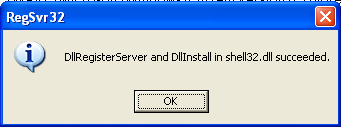
1- Click Start –> Run –> regsvr32 /i browseui.dll –> enter
A confirmation message will appear like given below
2- Click Start –> Run –> regsvr32 /i shell32.dll
Wait for the confirmation and click OK.
Method 4:
If none of the above methods work, please download our Smart Virus Remover from here:
[download id=”6″]
Using this Virus Remover please restore your Windows settings and your show hidden files and folders will be set to default.
Please spare a few moments from your precious time and tell us about your experiences.
Comments
1,097 responses to “Show Hidden Files and Folders not working?”
Thank you Very much … !!!
if you cant show your hidden files using step given above, then i suggest you go the safe mode first then proceed with the step given above. Then why not you continue to delete the autorun file, .dll in the safe mode.
thank you very much
the first two methods didn’t work but the third method worked perfectly
thanks alot i really suffered trying to know how to do it
Thanks Buddy!
I faced the same Problem on both – my laptop & computer. The Virus was CKVO0.dll
Ur 2nd option worked 4 me, Hope it does 4 others too. The virus is still there, but avast alerts me when it tries to get active.
U ROCK !!!!!!!!!!!!!!!
both methods didn’t work.. i dont really want to try the 3rd tho :<
help wah!
this is annoying. i have like 5 hidden folders and i can’t access them now cos the stupid folders wont show.
thanks! It worked!!
Thanks,
Applied Method 1 , no effect,
Method 2 – worked Ok to show hidden files.
Whoa! Extremely helpful website, thanks for the help!
Hi,
I had this hidden files problem for almost an year, your solution worked for me, I appreciate your help. You guys are awesomeeeeee 🙂
Thanks
Shoaib
thank u……
Try this command:
Its 100% working
cmd:
d:\attrib /s /d -h -s
same for all drives
e:\attrib/s /d -h -s
Thanks alot for your information
tanx a lot dude……..i was a hell lot worried 2 solve dis prob……..nice blog too
very thank you.i am iranian
The first 2 methods were not workin……the 2nd method had solved my prob about a yr back when i had the same prob……this time it didnt(i could modify the checked value to 1 but then when i went back i found that it was again reset to 0)…..
i downloaded the smart virus remover,
dbl clicked the downloaded .exe file,
right clicked the smart virus remover icon in the task bar,
selected restore default windows settings and then clicked OK
and then restarted my pc…..now i am able to see my hidden files and folders…
also in the registry editor i found that checked value is set to 1(in SHOWALL folder) and in the NOHIDDEN folder its value is 2
thx a lot!
SMART VIRUS REMOVER ROCKS!!!
Works fine for me..Thanks man.. searched a lot and finally i got the proper solution here…
Thank!
This worked wonderfully, it took only 2 minutes to get back the “Hidden Files and Folders” functionality 🙂
Arigato!!!
Smart Virus Remover rulezzz!!!!
Hej Sanix , yes your cure to recreate “Show hidden files and folders” WORKED ! THANX
Thanks a lot! 😀 my Show hidden… restored!
Hell ya!! thanx to Smart Virus Remover my now i can acces my hidden files and folder ……..Smart Virus Remover saved my pc and it removed some other vius i didnt know about..lol…thx to the creaters to….i found this web site from google ived been on this problem from the morning and it took all day to find this website….i was about to quit when i sawthis program…..and it got fixed!!!!!worked on it from 9am-6:20pm until i found Smart Virus Remover….it only took like 2 min to finish it all!!!
Thanks buddy!
I tried all these methods but no thing was changed. Can you help me further. I even format the drive C many times and reinstall win XP several times and I did the listed three methods but I still can not see the hidden files and in addition to that when i double click any drive in my computer window, its opens in a new one. Please help me further if u can
thanxs buddy , itried AVG my vavorite V 8 , no use . but yr smart removal just in less than minute finish my fears ,,,, thanxs alot
This tool is rubbish
nice 2 give guide lines 2 computer users ,
i was facing some problem on my p.c
while double clicking the local drives(hard drives) a seperate windows menu was coming,oniy at local drives, but not when double clicking the folders in that local drives.
yet i was using avast anti virus when we scan the computer a menu of that programe which ask for restart later it will scans the system again the menu for restart was comming .
when i plug usb to p.c virus found message comimg even though i format the usb also .this was coming the for all models of usb.
can u give ur suggestions to me and save my p.c aganist threats
awiting ur response.
The first one I saw on another site and it didn’t work for me, however, there was a link to this site and I found that the second solution worked fine for me. Hope this helps other people as well!
ARGH!!
None of the solutions worked!
I know I don’t have a virus, this happened when i used my friend’s USB to obtain a hidden file.
Please HELP!!!!
Many thanks, Sanix, either method works. I tryed the Method 2: (By Random Hajile) first and it did work for me, cheers!
Thanks sir 🙂 🙂 🙂 🙂 🙂 🙂 🙂 🙂 🙂 🙂 🙂 🙂 🙂 🙂 🙂 🙂 🙂 🙂 🙂 🙂 🙂 🙂 🙂 🙂 🙂 🙂 🙂 🙂 🙂 🙂 🙂 🙂 🙂 🙂 🙂 🙂 🙂 🙂 🙂 🙂 🙂 🙂 🙂 🙂 🙂 🙂 🙂 🙂 🙂 🙂 🙂 🙂 🙂 🙂 🙂 🙂 🙂 🙂 🙂 🙂 🙂 🙂 🙂 🙂 🙂 🙂 🙂 🙂 🙂 🙂 🙂 🙂 🙂 🙂 🙂 🙂 🙂 🙂 🙂 🙂 🙂 🙂 🙂 🙂 🙂 🙂 🙂 🙂 🙂 🙂 🙂 🙂 🙂 🙂 🙂 🙂 🙂 🙂 🙂 🙂 🙂 🙂 🙂 🙂 🙂 🙂 🙂 🙂 🙂 🙂 🙂 🙂 🙂 🙂 🙂 🙂 🙂 🙂 🙂 🙂 🙂 🙂 🙂 🙂 🙂 🙂 🙂 🙂 🙂 🙂 🙂 🙂 🙂 🙂 🙂 🙂 🙂 🙂 🙂 🙂 🙂 🙂 🙂 🙂 🙂 🙂 🙂 🙂 🙂 🙂 🙂 🙂 🙂
thank u Mr. Sanix For Solving my prob which was to show hidden files and folders which was infected by virus. iam really thankful to u for ur his kindness. thanks again
Yes.This is the most common problem in Windows.Kill virus!
Option 1 and 3 didn’t work for me, but 2 did. Awesome, thanks a lot!
Follow the steps told by Sonal Jain. It worked for me.
Thanks Sonal.
I found following virus definitions on my system – rcukd.cmd, disabled this file from msconfig utility, removed this file from all local drives using command
“attrib -r -a -s -h rcukd.cmd” (runthis command on all drives)
Cheers,
Kishor
None of this methods works for me… every time i change the value to 1 and after i restart the pc, CheckedValue is 0 again 🙁 please help
Thanx it worked.
cool dude…. excellent. Method 2 worked for me.
Thank you very much for your tutorial, Option 2 worked for me.
Thanks once again
thanks a lot
salam…
thank dude..im very beginner plus ammature in this area..today i’ve done kill my virus and solve my pc prob with the info from this page..thank..and very2 thank you so much..hmmm anybody could tell me how to attach an image to blog(posting) so i could comment or post with an image inside..:)
Dear locquel, I’m glad you solved your problem. If you want to share any picture with us, please mail it to sanix @ technize.com and I’ll post it on the blog.
Thanks ..
Helpful ..
Thanks a lot for your valuable suggestions, but even after trying all the three options, i am not able to select the “show hidden files/folders option”. Updating the registry manually, also doesn’t help, as it changes its value automatically after a few seconds.
The smart virus remover also does not show any virus. I also deleted the autorun.inf files and restarted my pc a number of times, but this file gets created automatically all the time.
I am using Windows Server 2003. Kindly advise, what can be done?
Balasubramaniam please make sure there are no traces of virus on your system. These methods will work only when the virus has been completely removed. Otherwise if the virus is still active, as soon as you change the registry, it will be reversed again.
Hi its working fine .
Thanks,
Thanks a lot for your immediate response.
Can you suggest me any antivirus/anti-spyware which can clean my system, coz the smart virus remover which i installed does not show or does not detect any traces of virus on my pc.
Thanks !
Balasubramaniam, Smart Virus Remover is only for a few common viruses. It is not a full fledged antivirus. You can see the following article which has got quite a few options for free antivirus software:
Top 5 Free Antivirus Software
Thanks a lot for the valuable information and for your suggestions.
I will definitely try the antivirus you suggested and see if it solves my problem and let you know about the same.
Thanks again for your valuable time and information.
I installed the ‘Rising Antivirus’ and scanned for viruses. Although it took a long time (almost 5 hrs.) to locate and remove/clean viruses, it was very effective and it solved my problem.
I changed the registry after cleaning all viruses, it worked.
Thanks a lot for your kind co-operation and very valuable advise.
Hope i face another problem soon, so that i can visit your website and gain more knowledge.
Thanks and regards
Glad to know that you solved your problem. Keep visiting Technize.com. If you have any problem, feel free to contact us.
Hello and Good Morning !
This time i have a problem related to Folder Lock 5.2.6
It was working fine till yesterday. But after cleaning viruses on my pc, i ran the tuneup utilities 2007 on my pc to clean the registry entries.
After this when i opened my folder lock folder, i could not see any file in the locker directory.
Pls. advise how could i get my files back. I even tried uninstalling and re-installing folder lock on the same drive, but in vain.
By the way, you can get full licensed version of TuneUp Utilities 2007 from here:
Get Free TuneUp Utilities 2007 Full Version
Thanks & Sorry for the inconvenience !
I solved this myself.
i used the command prompt to view if i can see my files (e:\folder lock>dir/a/s) under the same directory and to my surprise i could see all my files.
E:\folder lock\locked\ascii>
the directory under ascii was showing some special characters
252 177 183 176 210 252 (i think the ascii characters might be differenct in different computers)
I then moved into the directory and with the moved command, i moved my directory out of this folder.
Hope this might be useful to others.
Balasubramaniam, great work :-). Solving is always a fun job if we’re not stuck anywhere :-).
Oh ! Actually, when you suggested me an antivirus, i downloaded it, plus i also downloaded other softwares which might be useful to me from your website only. There is a great collection of free softwares at your site.
Thanks a lot, see you soon !
hey! i tried da whole deal….i criusly dunno wot i did wrong…but in d end…all iv managed to do is dat nw even da show hidden files and folders option is not VISIBLE, it just sez do not show hidden files and folders! wot do i do???? 🙁
HELP!!!