
A few days back, a client came to me and told me that he was having trouble with his Windows XP. The show hidden files and folders was not working at all. If he selected the radio button “Show hidden files and folders”, and then press Ok .. the changes would just disappear upon opening the dialog again. It was probably some virus attack after which the Windows registry was not being updated properly. So here is what I did to restore it back. There are so many methods to restore back the registry. If one method is not working, please try another one.
Method 1:
Go to registry editor by running regedit in the run box.
Go to this key:
HKEY_CURRENT_USERSoftwareMicrosoft
WindowsCurrentVersionExplorerAdvanced
In the right hand area, double click hidden and change the value to 1.
Now you’re all set to go. Check it in your tools menu if the changes have taken effect.
Method 2: (By Random Hajile)
1. Click “Start” -> “Run…” (or press Windows key + R)
2. Type “regedit” and click “Ok”.
3. Find the key: HKEY_LOCAL_MACHINESOFTWAREMicrosoftWindowsCurrentVersionExplorer
AdvancedFolderHiddenSHOWALL
4. Look at the “CheckedValue” key… This should be a DWORD key. If it isn’t, delete the key.
5. Create a new key called “CheckedValue” as a DWORD (hexadecimal) with a value of 1.
6. The “Show hidden files & folders” check box should now work normally. Enjoy! 
Method 3: (By Denny)
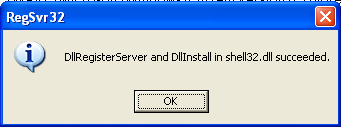
1- Click Start –> Run –> regsvr32 /i browseui.dll –> enter
A confirmation message will appear like given below
2- Click Start –> Run –> regsvr32 /i shell32.dll
Wait for the confirmation and click OK.
Method 4:
If none of the above methods work, please download our Smart Virus Remover from here:
[download id=”6″]
Using this Virus Remover please restore your Windows settings and your show hidden files and folders will be set to default.
Please spare a few moments from your precious time and tell us about your experiences.
Comments
1,097 responses to “Show Hidden Files and Folders not working?”
Amazing, it worked.
thanks a lot
thnak you your best solution for shoe hidden files & folder
Excellent dude, it’s working. Good Job 🙂
tahnk you very much.it worked
alsalm alykoum we rahmet allah we barakaoh
thnx for this great job
the first two methods didn’t work for me ,,, however ,,, the virus removal software did the whole job for me ,,
thanks again & again ,, I have been suffering from this problem for some time.
I had not keys and folders of Method 2, but I created them and WORKS!!! Thank you
Thanks Very much for this great job
I very much thank you for your Anti-Virus program.
When nothing helped this little program did it.
TANX!!!!
awsome teaching.. now my folder option is working properly. thanks alot alot alot
this little program of yours really did the job for me.
thanks pal
Absolutely great! 🙂 Many thanks!!!
thank you very much, it’s been a great help..
but can you plz give the source code.
Thanks alot, the first method worked out with me fine. thanks
hello. my “Show Hidden Files or Folders” is completely missing. under the “Hiddens Files and FOdlers” option there is only one RadioButton option that says – “Do not show hidden files or folders” and it’s selected. how can i get my “Show Hidden Files or Folders” back?
My problem was that, am not getting the show hidden files radio button under Folder Options.
The second option worked for me.
Earlier there was no DWORD for CheckedValue in SHOWALL in my registry. So, created a new DWORD and voila i was able to see hidden files.
Thanks for the post.
hi guys, thank you so much, i was having this problem since jan08 and i just didnt know what the hell to do.i tried option it didnt work and tried option 2 and it worked. thank you so much guys.
many thanks n best regards
dhirav
my computer at home was infected with viruses and even after removing the viruses, i couldn’t see the hidden files and it was very hectic for me to see the hidden files and i tried googling for the solution and i found the method 2 described above was very helpful.. thanks a lot..
Thank you everybody who took time to comment here and everybody who solved their issue from this article. I am looking forward to knowing other computer problems. So if you have any kind of problem regarding computers, please tell us and we’ll try to troubleshoot the problem.
urs solution for view hidden file…fantastic
u awesome
urs solution helped me…
everyone told me i need to format my PC to remove this problem..
but ur solution(method 3) worked…
Thanks a million…
🙂
hey dude ..thanx man… ur suggestion regarding Hidden files helped us in sloving the prob.. gud.. !! keep d gud wrk.. !!
Thanx for your info. It’s an useful instruction.
WOOOOHOOOO!! THANK U SO MUCH RANDOM HAJILE!! AND U TOO TECHNIZE PEOPLE! MUACK! KUDOS TO ALL!!
Thanks TECHNIZE. It really works. Solved my problems. Thank you again.
First solution worked perfectly. Thank you
Thank’s for the software.. because the 3rd method is worked..
Thank You Dear
thanx,this helped me a lot
Hello
My emailid:nikhild15@rediffmail.com
i used a pen drive of a friend,and he just bought it 2 weeks before, i brought some data from him using his pen drive, then i used all th nessecery precation of using it.
I safe ly removed it but then also some problem oucrred. the problems that my friends computer faced had now started in my PC.
Problems:
When i open my computer and tried to open a drive it opend in another window but the folder in the drive open in same window.
The folder option is not working and unable to view my hidden docs.
I had a Nortan protected recycle bin which allows my to get files which are automatically deleted.
in that i saw that 2 files :
one the autorun.inf and the other like dos file named Xqf.com and these files where deleted by exploreer and every second the number of such files increase as i have 4 partitions so evrey partition gets 2 files of bothe the above mentioned files and every second exploreer deletes them and they get collected in nortan protected recycle bin.
All the problems that my PC face are also in my frnds PC TOO.
I alo used ur smart virus remover but nothing was done.
Please solve this problem and reply me on my email id.
Thanks Technize
I’m installed the smart remove virus software. the virus had been removed, but now i can’t open my drive c and d. it show the open with window
Thank you Sanix and Random Hajile!!!!!…..the second option appears to have solved my problem of unworking show hidden files and folders! : )
Thank you very much. The second option worked perfectly.
Using this Virus Remover please restore your Windows settings and your show hidden files and folders will be set to default. >> will this delete my files or programs that I save on my PC?
I have the same problem, at first all the methods didn’t worked, but when i disabled the kxvo.exe or ckvo.exe at the startup, the problem is solved… TO do this. >>
Go to run>> then enter MSCONFIG, and at the startup tab, uncheck the kxvo and ckvo then restart the PC.. Then Follow method 1 and/or method 2.. The problem should be solved by now..
kxvo and ckvo.exe are malwares or virus , well i dont really know, Can someone help me how to remove those things ?? ^_^
thanks a lot for show hidden files n folders option.worked well
thanks for help if u konw any more?
Thanks for the solution.
I faced this issue today and followed the registry editing method one… worked like a charm!
Issue resolved!
Hi have the same problem i will try now……….
Dear sanix,
I sent you 2 removal tools one to enable hiddenfile and folder option and another for autorun virus. you have not yet provided them in the download page. As i know it working and can help these poor fellows facing the problem.
Warning! Spyware detected on your computer!” with blue screen…
i have Nod smart security but my machine is still infacted…….there is any removal……plz help me
Hey Thanks a lot…
The 2nd step worked for me… Im Happy now 😉
The 2nd step worked for me . its brilliant information
nice
Third method worked for me! Many thanks from Brazil!
thnx a lot!!!workd out on the ver 1st attempt..thnx again
thnx a lot!!!workd out on the very 1st attempt..thnx again
Thanx
The second method worked with me
i used method 1
its helpfull
thnx alot
smart virus remover really rocks….
thank you very much, my ps’s fine now
Beautiful! worked a treat when i lost my ‘Users’ folder 🙂