
A few days back, a client came to me and told me that he was having trouble with his Windows XP. The show hidden files and folders was not working at all. If he selected the radio button “Show hidden files and folders”, and then press Ok .. the changes would just disappear upon opening the dialog again. It was probably some virus attack after which the Windows registry was not being updated properly. So here is what I did to restore it back. There are so many methods to restore back the registry. If one method is not working, please try another one.
Method 1:
Go to registry editor by running regedit in the run box.
Go to this key:
HKEY_CURRENT_USERSoftwareMicrosoft
WindowsCurrentVersionExplorerAdvanced
In the right hand area, double click hidden and change the value to 1.
Now you’re all set to go. Check it in your tools menu if the changes have taken effect.
Method 2: (By Random Hajile)
1. Click “Start” -> “Run…” (or press Windows key + R)
2. Type “regedit” and click “Ok”.
3. Find the key: HKEY_LOCAL_MACHINESOFTWAREMicrosoftWindowsCurrentVersionExplorer
AdvancedFolderHiddenSHOWALL
4. Look at the “CheckedValue” key… This should be a DWORD key. If it isn’t, delete the key.
5. Create a new key called “CheckedValue” as a DWORD (hexadecimal) with a value of 1.
6. The “Show hidden files & folders” check box should now work normally. Enjoy! 
Method 3: (By Denny)
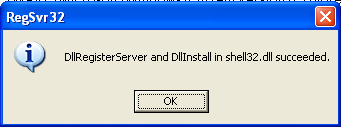
1- Click Start –> Run –> regsvr32 /i browseui.dll –> enter
A confirmation message will appear like given below
2- Click Start –> Run –> regsvr32 /i shell32.dll
Wait for the confirmation and click OK.
Method 4:
If none of the above methods work, please download our Smart Virus Remover from here:
[download id=”6″]
Using this Virus Remover please restore your Windows settings and your show hidden files and folders will be set to default.
Please spare a few moments from your precious time and tell us about your experiences.
Comments
1,097 responses to “Show Hidden Files and Folders not working?”
Hi,
Thanks for the update, but IT DOES NOT WORK. The value radio button stills shows at “do not show”. let me know some other way.
Hi,
1) Try doing a complete virus scan on your pc (I used Rising antivirus). Eliminate all the viruses, if any.
2) Restart your pc.
3) Open Regedit and change the DWORD value to 1 manually, as mentioned in method 1 and 2 respectively.
4) Now check the folder options.
Try if this works
I’ve a problem. i cannot see few folders in my pen drive. I thought it might be hidden. So checked hidden files option in tools. Still the folders are not visible. what to do?
The smart virus remover worked for me. thanx much
Awesom man! Thanks a lot for this amazing info.
God Bless YA
thanks….this is very cool….i got it….this problem was with my computer for months i didnt know how to get rid of it….Thankssssssss
i am searching publicity
THanks a lot.
Thank you very much…I was really very much worries about this problem but technize solve my problem…
This is very helpful and great site for all computer user
Thank you so much Technize team
hi,
sir , thank u very much now i am able to see my hidden folder by changing the value to 1 , really thanks for ur suggestion ,it was because of virus name autorun.inf
thankyou
Thank you very much, it is nice to know that there is still good sites to trust in the internet and still helpful as well.
Rgds,
Christy
Thank you for posting this. It worked on my computer and it was really helpful for me. Thanks again.
Thx for this.its work for me.
thank i fix the problem
The first one no but if first and second step done it worked great. Thanks
thank you very much second method worked.
all of them doesnt work
hello my dear friend.
I really dont know how to thnk you, bcoz it is ith the help of your solution tht i got back my folders which were hidden.
thnk you very much.
Hello,
Thanks for the tip, the first option worked like a charm. I really appreciate your site.
I had this problem for along time no thing worked except the smart tool you put
its like magic!
thank u
p.s:the virus was abk.bat
Whats up man
Thanks for usefull removal tool.
Your removal tool together with hijackthis
make the system healthy again
thanks a lot!!!!!
I wish for 2009 health, peace and happiness 4all !!!!
Greets
gismo nindo
Hi,
Its awesome!!! worked like a fire.. thanks chum.
Faisal
THANKS!!!!!!!!!!!!!!!!!!!!!!!!!!!!!!!!!!!!!!!!!!!!!!!!!!!!!!!!!!!!!!!!!!!!!!!!!!!!!!!!!!!!!!!!!!!!!!!!!!!!!! VERY COOL…….
nice virus removal program
worked perfectly
thanks
THANK YOU!!! The second fix worked great! Many thanks for the help!
Method 3 is working for me..thanks
realy thanks alot!
Method 2 is very useful, let me find back my hidden file!
realy thanks alot!!!!!thanks!!!
Hi,
The solution works perfectly.
Thank you…
thanks a lot guys.. hidden option worked again..thanks a ton..
hello, greeting from indonesia.
your tutorial is great, the second method works for my PC.
thank you very much
Never could find “Local settings” in windows explorer. Could only find it using search. Could change its properties by unchecking “hidden”. On restart it was gone again. #1 worked!!!. Thank you, thank you.
Rick
Smart Virus remover rocks……its the ultimate solution
hi bro wats up…..
i like ur solutin and its worked on my com thks bro. u really rocks
Many thanks for the show hidden files and folders fix.
saved me loads of time.
Now I can spend the rest of the day without worry.
Thank you very much. Your “smart virus remover” is quite smart after all :)))
Thanks again and keep up the good work!
Hi,
My problem is solved with “Smart Virus Remover”. Best application.
Thanx a lot for this.
this is very good softwar and very samll size, i like it, thanks,
I HAVE TRIED EVERY THING BUT NOTHING HAPPENS
Divyesh it seems that the virus is still prevailing in your system. You should first clean the virus and then then methods mentioned here will work. To get a good free antivirus see the following article:
Top 5 Free Antivirus Softwares
thanks alot it worked by method 1
thanks………a lot… is very very gooddddd
Smart Virus Remover helped.
Thanks guys
thanx a lot
Thank You
Hi Buddy,
This problem still exists for me…
i tried all your 3 options. but none of them worked in my system
the first 2 options on regedit, it does not work fully. Even if i change that CheckedValue. It automatically gets changed to 0.
That virus removal software also not restoring my hidden files.
The problem of not able to viewing my hidden file still remains in my computer,
Please help.
Many Thanks,
Sugesh
hi!
I tried all the three methods posted here but my folder options is still not working…
What should i do?
Whenever i click the folder options it won’t open.
Thanks!
uhm… Well, my folder option showed up but another problem is the button “do not show hidden files” can’t be changed…
what should i do?
Thanks!
T H A N K S !!!!
THE SECOND (RANDOM HAJI) WORKED GREAT… THANKS A LOT !!!!
that worked man,,thnks for sharing good work Random Hajile,
Many many many many Thank you dear………..
thanks for your info, it works!!