
A few days back, a client came to me and told me that he was having trouble with his Windows XP. The show hidden files and folders was not working at all. If he selected the radio button “Show hidden files and folders”, and then press Ok .. the changes would just disappear upon opening the dialog again. It was probably some virus attack after which the Windows registry was not being updated properly. So here is what I did to restore it back. There are so many methods to restore back the registry. If one method is not working, please try another one.
Method 1:
Go to registry editor by running regedit in the run box.
Go to this key:
HKEY_CURRENT_USERSoftwareMicrosoft
WindowsCurrentVersionExplorerAdvanced
In the right hand area, double click hidden and change the value to 1.
Now you’re all set to go. Check it in your tools menu if the changes have taken effect.
Method 2: (By Random Hajile)
1. Click “Start” -> “Run…” (or press Windows key + R)
2. Type “regedit” and click “Ok”.
3. Find the key: HKEY_LOCAL_MACHINESOFTWAREMicrosoftWindowsCurrentVersionExplorer
AdvancedFolderHiddenSHOWALL
4. Look at the “CheckedValue” key… This should be a DWORD key. If it isn’t, delete the key.
5. Create a new key called “CheckedValue” as a DWORD (hexadecimal) with a value of 1.
6. The “Show hidden files & folders” check box should now work normally. Enjoy! 
Method 3: (By Denny)
1- Click Start –> Run –> regsvr32 /i browseui.dll –> enter
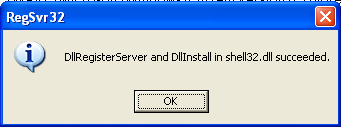
A confirmation message will appear like given below
2- Click Start –> Run –> regsvr32 /i shell32.dll
Wait for the confirmation and click OK.
Method 4:
If none of the above methods work, please download our Smart Virus Remover from here:
[download id=”6″]
Using this Virus Remover please restore your Windows settings and your show hidden files and folders will be set to default.
Please spare a few moments from your precious time and tell us about your experiences.
Comments
1,097 responses to “Show Hidden Files and Folders not working?”
Thanks it works well
“Random Hajile” you totally ROOOCK, man, now I can breath again, having my problem solved.
Hi
Thank you very much. To whom so ever, for smart_av.exe its a very nice tool to see the Hidden files. its worked stright away to me.
Here is the tool
http://technize.com/2008/01/22/smart-anti-virus/
thanks man!!!!! d 2nd one did d job keep it up
thx alot buddy
kooollllll…
all the times when i faced this problem i keep on formating windows but frm ur three methods first 2 didnt worked but ur software saved me…..its awesome yaar….thanx for the software…!!
I was really getting mad with this problem… but thanx a million…. ur solutions were awesome.
Keep up ur good work…
Thank you ……………Thanks a lot
I was struggling to retrive my hidden folders for a couple of days…..finally I am able to retrive it with your help….I am relieved now
Thanks again.
Dr Mahesh Devnani,MHA
Thanks a lot for the info. My comp got infected with some virus and ever since I haven’t been able to retrieve my hidden files. But your blog helped. Thanks again!
its work tq
2nd method is Best way to get rid of this error….. Thanks to person how introduce it & how paste it here..
Thanks a lot. Second option really works. Thanks again.
Restore All Folder Option Settings:
Method two worked for my situation. Thanks for your help. Great Blog.
Thank you so much for your explanation. I already tried and it worked. Once again thank you for sharing your knowledge.
method 2 worked with me :)))) and am really so thankfull for supporting 😀
Hey thanks bud! your instructions worked….
cheers!
thanks dude..its working..
thanks Random Hajile
your solution worked….
thanks a lot…
thanx bro that smartantivirus is an awesome antivirus ……..
thanx a lot from my frnds side tooo
thanx buddy .. ur second option work
Method 2 works smoother than Method 1. Hey, why is there no direct way of uninstalling Smart AntiVirus?
Thank you very much I now can show hidden files
regads
thanx for d help dude! =D
i had the same problem yesterday..started with a virus called semo2x.exe..(its a new virus as far as i know)…i downloaded pc tools antivirus it detedted it and deleted it but then my drives didnt open so i downloaded disk heel used it worked…then my hidden files didnt open so i followed the steps of the registery solution and it worked 🙂
Thanks Yaar It’s Really Worked
thanks for the help it works u guys rocks//
it works… thanks!^_^ God Bless..
Great,……
Its realy working…Now i can see all hiden folders.
Tahanks………Great Help to me
thx a lot. I fixed the problem using Method 2. I’m just curious when did the registry being changed.
Thanks mate. Method 2 worked for me. my system was infected by ravmon virus, which started all this trouble.
Cheers!!
Thank you, its working
Test
This is the best option and the only one that works better.
HKEY_CURRENT_USER\Software\Microsoft\Windows\
CurrentVersion\Explorer\Advanced
Hidden = “1”
HKEY_LOCAL_MACHINE\Software\Microsoft\Windows\
CurrentVersion\Explorer\Advanced\Folder\
Hidden\SHOWALL
CheckedValue = “1”
HKEY_CURRENT_USER\Software\Microsoft\Windows\
CurrentVersion\Explorer\Advanced
SuperHidden = “1”
ShowSuperHidden = “1”
thanks sir
Your solution really helped me to see the hidden files. Thank you very much !
Works great, thank you 🙂
i used symentech and avira, but they didnt work perfectly.
but all these tips work nicely and save my time.
Thanks all of the honourable team members whos are helping and share their knowledge.
Thancccxx yaar……. method 2 worked 4 me…….
Hi Sanix,
Thanks for ur logic……. and it works GREAT…….
I had solved the probelm with Ur 2nd method.
Thank you so much! and keep up..
Method 2 worked for me. Thanks.
method 2 works for me too..thanks
Thanks dude…it helped me alot.Really you saved me alot of time.
Regards,
-Praveen
Excellent information mate..thanx a lot..helped solve a chronic problem..cheers
THANKS!
the second option worked for me 🙂
YAHOO!!!
Thanks. The first method did not work (it left the default unchecked in both option and checking “show hidden” did not yield results). The second method worked.
Thanks a lot. For me also first method did not work (When i used this both the radio buttons were unchecked and when i try to check the “show hidden” it went back to “Do not show”). But second method worked
Thanks, both methods works.
some times the registry editing trick is not working. After i change the value it used to same 2 after I save it.