
A few days back, a client came to me and told me that he was having trouble with his Windows XP. The show hidden files and folders was not working at all. If he selected the radio button “Show hidden files and folders”, and then press Ok .. the changes would just disappear upon opening the dialog again. It was probably some virus attack after which the Windows registry was not being updated properly. So here is what I did to restore it back. There are so many methods to restore back the registry. If one method is not working, please try another one.
Method 1:
Go to registry editor by running regedit in the run box.
Go to this key:
HKEY_CURRENT_USERSoftwareMicrosoft
WindowsCurrentVersionExplorerAdvanced
In the right hand area, double click hidden and change the value to 1.
Now you’re all set to go. Check it in your tools menu if the changes have taken effect.
Method 2: (By Random Hajile)
1. Click “Start” -> “Run…” (or press Windows key + R)
2. Type “regedit” and click “Ok”.
3. Find the key: HKEY_LOCAL_MACHINESOFTWAREMicrosoftWindowsCurrentVersionExplorer
AdvancedFolderHiddenSHOWALL
4. Look at the “CheckedValue” key… This should be a DWORD key. If it isn’t, delete the key.
5. Create a new key called “CheckedValue” as a DWORD (hexadecimal) with a value of 1.
6. The “Show hidden files & folders” check box should now work normally. Enjoy! 
Method 3: (By Denny)
1- Click Start –> Run –> regsvr32 /i browseui.dll –> enter
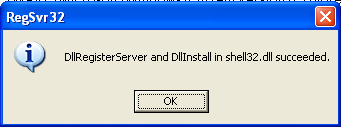
A confirmation message will appear like given below
2- Click Start –> Run –> regsvr32 /i shell32.dll
Wait for the confirmation and click OK.
Method 4:
If none of the above methods work, please download our Smart Virus Remover from here:
[download id=”6″]
Using this Virus Remover please restore your Windows settings and your show hidden files and folders will be set to default.
Please spare a few moments from your precious time and tell us about your experiences.
Comments
1,097 responses to “Show Hidden Files and Folders not working?”
Hi Sanix,
Thanks a lot yaar. The second method worked for me.
Cheers !
THANKX A LOT DUDE….
very nice website very use full thanking every one
woowww MAN U R AWESOME THANX A LOT WOOWWW I AM ASTONISHED
WOOWWWW THANXS A LOT U SAVED MY COMPUTER FROM FORMATIN
THANXXXXX
hi! it’s works many many many many thanks
Thank You very much. Method 2 worked! Do I still have to download the virus cleaner?
Hussain if the problem is solved then you don’t have to download the virus remover. Make sure that you have an updated antivirus. That’s it. Stay clean stay happy 🙂
Thnks alot 2nd method work
Going through the registery process worked out..so interesting
thank u so much guys
Random Hajile’s Method 2 works for me. That is great. Thanks
I do 3 methods but show hidden file and folder not working again.please help me.
the 2d one worked successfully…
ThanQQQQQQQQQ very muchhhhhhh……
i bookmarke ur page….once again thanccccccxx
Thank you very much man. Though the first one did not turn up the second one worked successfully.
The Second one work flawlessly.. thanks!! =)
Thanks Bro!!!
Its Working now…. i was managing to go to my hidden files via address bar and it was so disturbing…lol
Thanks once again
thank for the .exe application i was able to view my files …
Thanks….
Its Very Good…
second method worked. thank you! =]
I’m very grateful for the info provided. I’ve been having trouble showing my hidden files. Method 1 worked for me. Thanks a lot!
hey..
method one dint work.
method 2 worked for me.
my system if affected by some virus whoch doesnt allow me to visit any anti virus website( thereby i cant update the anti virus also, hav to do a work arnd for tat)
thnx a lot. now i can see hidden files.
http://www.youtube.com/ChandruBS
thanks you sir it worked for my pc
It worked!!!!!!!!!!!!!!!!!!!!!!!!!!!!!!!!!!!!!!!!!!!!!!!!!!!!!
I’ve encountered very often this problem.
And different solutions through registry editing, but may of them didn’t work.
Thanks a bunch! You helped a lot of people including me with these problem.
yippiiiiiii….
problem solved with using software ….
so many thanx 2 u..
gr88888888888888
thanks
thanksssssssss
Now my system works fine.thanks for a nice solution.
Clicking the “Show hidden files and folders” option in Windows (XP) has no effect on my folders. It keeps resettig itself to the “do not show” folder option. How do I resolve this problem.
COOL YAR,,,,,,,,
WITHIN NO TIME U HAVE HELPED US TO CURE THE PROBLEM ,,,,,,
THANKS………………
Hi bro pls tell me How to delete yahoo account
Ajay please see the following forum post to delete your yahoo account:
http://www.technize.com/forums/security-and-troubleshooting/how-to-delete-yahoo-and-hotmail-accounts
The first method didnt work. But the second method did. Thanks a lot!!
Thanks a lot…
Method 2 worked… 🙂
i reached here through google…
Thank you…
Arun Kumaar.S
thank you boss
Thanks! Worked for me
Its a nice tip. Using it, I have solved my problem. Now files/ folders can not play hide and seek with me.
No way,, non of the above methods worked for me. When I restore my windows after installing Smart Virus Remover, the show hidden file work okey for a while then it returns in active.
nod32 still could not detect this virus (2009) but your antivirus works well !!
This problem is due to Some kind of RAVMON Virus
Thank you for your info….. I managed to solved it using the below.
😎
Method 2: (By Random Hajile)
1. Click “Start” -> “Run…” (or press Windows key + R)
2. Type “regedit” and click “Ok”.
3. Find the key: HKEY_LOCAL_MACHINE\SOFTWARE\Microsoft\Windows\CurrentVersion\Explorer\
Advanced\Folder\Hidden\SHOWALL
4. Look at the “CheckedValue” key… This should be a DWORD key. If it isn’t, delete the key.
5. Create a new key called “CheckedValue” as a DWORD (hexadecimal) with a value of 1.
6. The “Show hidden files & folders” check box should now work normally. Enjoy!
the Method 2: (By Random Hajile) solved my problem..thank you very much! I give my warmest gratitude to the poster! Thank you and GOD Bless.! I hope this world will be filled with people like you!! =)
I m facing same problem regedit changes also not working.
virus removal tool showing msg ” The Registry File Not Found. Download the Removal Virus Tool again.”
now what to do. Please help me
Altamash, have you downloaded our smart virus remover? can you give a little more detail about your problem so that we can suggest some solution?
smartvr works like a charm even though it did’nt find any virus it just make the “show hidden files and folders” work again.
Many Thanks ^_^b
thanks it works !!!
Im facing the same problem about the hidden files and folders, but thanks for the information I managed to solve the problem.It Works..!!IT was great.THANKS..!!
Method 1 worked .. so nce of you dude
gr8 job bhai…………bhut ache………….problem solve ho gyi meri……..thanx genius……….
plz tell me the tweak through which ican rename my start button………..
i have hexa editor and exe editor ………
working very fine. Awesome. Thanks a lot.
I have downloaded the smart virus remover, and i do the following
Restore Windows Default Settings> Restore all folder Option Settings
and i get the following error
“The Registry File Not Found. Download the Ravmon Removal Virus Tool again.”
Akin this is a bug in the latest release of Smart Virus Remover. We’ve already fixed it and will release a new version shortly. Thanks for pointing out. Check for the updates soon.
Merci
i have been having aproplem with folder options
but ur methods r perfect
When the new version is avliable for download, can u guys post it on here so I can download it, would be very helpful
Sure Akin we’ll post the new version on Technize. Just keep visiting http://www.technize.com regularly.