
A few days back, a client came to me and told me that he was having trouble with his Windows XP. The show hidden files and folders was not working at all. If he selected the radio button “Show hidden files and folders”, and then press Ok .. the changes would just disappear upon opening the dialog again. It was probably some virus attack after which the Windows registry was not being updated properly. So here is what I did to restore it back. There are so many methods to restore back the registry. If one method is not working, please try another one.
Method 1:
Go to registry editor by running regedit in the run box.
Go to this key:
HKEY_CURRENT_USERSoftwareMicrosoft
WindowsCurrentVersionExplorerAdvanced
In the right hand area, double click hidden and change the value to 1.
Now you’re all set to go. Check it in your tools menu if the changes have taken effect.
Method 2: (By Random Hajile)
1. Click “Start” -> “Run…” (or press Windows key + R)
2. Type “regedit” and click “Ok”.
3. Find the key: HKEY_LOCAL_MACHINESOFTWAREMicrosoftWindowsCurrentVersionExplorer
AdvancedFolderHiddenSHOWALL
4. Look at the “CheckedValue” key… This should be a DWORD key. If it isn’t, delete the key.
5. Create a new key called “CheckedValue” as a DWORD (hexadecimal) with a value of 1.
6. The “Show hidden files & folders” check box should now work normally. Enjoy! 
Method 3: (By Denny)
1- Click Start –> Run –> regsvr32 /i browseui.dll –> enter
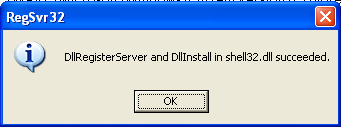
A confirmation message will appear like given below
2- Click Start –> Run –> regsvr32 /i shell32.dll
Wait for the confirmation and click OK.
Method 4:
If none of the above methods work, please download our Smart Virus Remover from here:
[download id=”6″]
Using this Virus Remover please restore your Windows settings and your show hidden files and folders will be set to default.
Please spare a few moments from your precious time and tell us about your experiences.
Comments
1,097 responses to “Show Hidden Files and Folders not working?”
thanks very. very very very much …………………………………
hi there
i did use ravmon on my vista pc but it didnt work
tell me what to do
best regards and thank u
Dude…The solution is working temporarily…. i mean if i go again to the folder options and select the show hiddden box, after checking it again it’s back to not hidden….NOD 32 updated didn’t detect any viruses…
thanks it help me
This will WORK!!!
Be aware that you actually may be infected by a virus, or maybe you once was, and the registry didnt get proberly restored.
You should open the registry, but remember to back it up. You can make a restore point in system restore, or just open the registry and export the whole thing, or export some selected keys.
Start >> Run >> (type) regedit >> (rightclick on the little my computer icon, and export the whole thing.)
find this key: HKEY_CURRENT_USER\Software\Microsoft\Windows\CurrentVersion\Explorer\Advanced. Go to the rightside of the window, where the values are. Find the value “Hidden” . Rightclick it and modify it to 1.
This next text is from my own registry. Kopy it to notepad, then rename the notepad file, so it have the extension .reg ,and then doubleclick it.:
Windows Registry Editor Version 5.00
[HKEY_LOCAL_MACHINE\SOFTWARE\Microsoft\Windows\CurrentVersion\Explorer\Advanced\Folder\Hidden]
“Text”=”@shell32.dll,-30499”
“Type”=”group”
“Bitmap”=hex(2):25,00,53,00,79,00,73,00,74,00,65,00,6d,00,52,00,6f,00,6f,00,74,\
00,25,00,5c,00,73,00,79,00,73,00,74,00,65,00,6d,00,33,00,32,00,5c,00,53,00,\
48,00,45,00,4c,00,4c,00,33,00,32,00,2e,00,64,00,6c,00,6c,00,2c,00,34,00,00,\
00
“HelpID”=”shell.hlp#51131”
[HKEY_LOCAL_MACHINE\SOFTWARE\Microsoft\Windows\CurrentVersion\Explorer\Advanced\Folder\Hidden\NOHIDDEN]
“RegPath”=”Software\\Microsoft\\Windows\\CurrentVersion\\Explorer\\Advanced”
“Text”=”@shell32.dll,-30501”
“Type”=”radio”
“CheckedValue”=dword:00000002
“ValueName”=”Hidden”
“DefaultValue”=dword:00000002
“HKeyRoot”=dword:80000001
“HelpID”=”shell.hlp#51104”
[HKEY_LOCAL_MACHINE\SOFTWARE\Microsoft\Windows\CurrentVersion\Explorer\Advanced\Folder\Hidden\SHOWALL]
“RegPath”=”Software\\Microsoft\\Windows\\CurrentVersion\\Explorer\\Advanced”
“Text”=”@shell32.dll,-30500”
“Type”=”radio”
“CheckedValue”=dword:00000001
“ValueName”=”Hidden”
“DefaultValue”=dword:00000002
“HKeyRoot”=dword:80000001
“HelpID”=”shell.hlp#51105”
Hope this was helpful
i have tried all of these tweaks but sorry to tell that nothing of this registry chnges worked for me if any one know any thing help full please help me .
whenever i click the D: or E: drive in mycomputer my Nortan 2007 shows that it has blocked “Hacktool.Rootkit” what is it? I have scanned thrice my system (full scan with Nortan 2007 and Windows defender) but they havent detected any thing malacious but still the alert is coming.
The hidden files too are not shown despite of editing the registry value to 1 in HKEY_CURRENT_USER\Software\Microsoft\
Windows\CurrentVersion\Explorer\Advanced
hidden files
Please suggest an appropriate solution . I run my pc on 768 RAM 80GB HDD Windows XP
i cant solve my prob. of how to enable show hidden files or folders so please give some suggestion. i have windows xp professional 2000. operating system so please give some solution
i have a prob. of show hidden files or folders not working so please give some feedback
thank u soo much!! it worked!! i have another question though.. wen i open my computer and click on any of the drives.. they dont open!! the “open with” window pops up.. and ONE more thing.. some of the files in my computer are highlighted blue.. as in their titles are in blue font rather than the normal black font…wat to do..
Its working….
Thanks.
I am from India, Thanks a lot. Now my hidden files can be viewed after I dowloaded Smart Antivirus and scanned the Lap Top. However Registry Edit method did not work. Two numbers Auto Run files were detected and removed. What a paid version of Norton Internet Security 2007 and AVG Anti Virus and AVG Spyware free editions could not do, was done by Smart Anti Virus. Thanks again.
hi frd.u goto tools and select folder options
and goto view and select show hiddenfiles and press ok
then u show the hidden files,,,,…
still u didn’t get means ur pc on virus
download updated norton & remove smart antivirus
ok bye
i got my pc infected by pws-legmir.gen.k.dll virus.everytime i open any of my hard disk my mcafee antivirus gives me a pop up n removes it but it come again along with amvo1.dll ….and i cant set my hidden files option to show hidden files it reverts back to do not show again…….my mcafee is till date updated but unable to remove it plz help me to remove this
Hey frnds, i am stuck in a prob, I can nt c my hidden files and folders, I hav done all the remedies given above. Whenever i change the value of attributes from 0 to 1 and close the window, It again changes to 0. and then the same prob I can’t c those hidden folders..
Please help me out
HEY THNK UUUUUUUUUUUUUUU
IT WORKEDDDDDDDDDDDDDDDDDDDDDDDDDD
Random Hajile……….THNANKS THANKS THANKS…..VERY VERY IMPORTANT FILES WERE THERE IN THAT FOLDER U R A SAVIOUR!!!!!!!!!!!!!!!!
THANX ALOTTTTTTT………….U R SIMPLY GR888888888888!!!!!!!!!!!!
i did it i follow as the instructions hear given but not works i googled lot same solution cleaned with anitivirus also not works.. i done a simple trick with the key..
1.open “regedit” in Run.
2. I followed these steps with little change.
198 NaMmOoR
December 17th, 2007 at 1:21 pm
” Random Hajile, on June 22nd, 2007 at 9:08 am Said:
If anyone’s still having trouble, here’s a fix that worked for me after I got the RavMon virus:
a. Click “Start” -> “Run…” (or press Windows key + R)
b. Type “regedit” and click “Ok”.
c. Find the key: HKEY_LOCAL_MACHINESOFTWAREMicrosoftWindowsCurrentVersionExplorerAdvancedFolderHiddenSHOWALL
d. Look at the “CheckedValue” key… This should be a DWORD key. If it isn’t, delete the key.
e. Create a new key called “CheckedValue” as a DWORD (hexadecimal) with a value of 1.
f. The “Show hidden files & folders” check box should now work normally. Enjoy! ”
3. I also changed in NOHIDDEN change value to 1
in SHOWALL change value to 0 , and check the folder option now
4. now change the values to the same
NOHIDDEN to 2
SHOWALL to 1
and you can see its works coooooooll…
dout i done it again i my friends pc. ROCKS…..
Can u please solve this for me?
WHENEVER I OPEN “FOLDER OPTIONS” “VIEW” and if i unchek or check and apply “DO NOT SHOW HIDDEN FILES AND FOLDERS” my internet explorer refreshes and all the open web pages changes to ‘about:blank-microsoft..”
My internet explore’s default i kept is http://WWW.mig33.com
hi. i have problem with my N72 mobile. it can not show me messanges in my PC. i am already reinstall pc suite and restore my phon but it not work. it show a message “opration can not be compleated”
please solve my problem and mail me
shuvo009@yahoo.com
Hi this is Arun, I wanted to thank both Sanix and Random Hajile for their time to solve this “hidden ” problem. Hails from India 🙂
thanks a lot……..!!!
it worked for me ..
your blog is just wonderful
Well, I have complete solution
It’s reason of virus who disable show/hide option of folder option
virus name amvo.exe, avpo.exe, oufddh.exe all are same first mostly require to remove from computer
open run>cmd
————-step1————–
c:\
c:\windows\system32\ (search also and remove amvo0.dll,amvo1.dll,avpo0.dll,avpo1.dll )
if it’s not remove try (attrib -a -s -h) attrib command on command prompt ( for more help try attrib /?)
———–step2————–
run>msconfig>startup[tab] // disable all suspected file
______step3_________
cmd>regedit
HKEY_CURRENT_USER>SOFTWARE>Microsoft>Windows>
currentVersion>explorer>advanced
set value = 1 of hidden
and
HKEY_LOCAL_MACHINE>SOFTWARE>Microsoft>Windows>
currentVersion>explorer>advanced>folder>hidden
set value =1 of showall
—————————————- now check ————
we must change on CURRENT_USER and LOCAL_MACHINE both bcoz system search read first from CURRENT_USER and
write first in LOCAL_MACHINE
——————————————————————–
I HOPE YOU MUST SOLVE THIS PROBLEM
sonal.jain13@yahoo.com
_____________________________________
Thanks Random Hajile your tip works for me.
please remove UST Scandal on my pc it coz a lot of trouble.
hello i’m so depressed of what happening on my pc .I think a certain virus attacked my pc. It coz a lot of trouble . Please help me to remove this virus! I know you’re so competent to do this things! i know you’re the only one can do this> Thanks in advance!
Just stumbled across this blog today and have already bookmarked it. This blog contains “ali baba’s” khazana for removing those viruses. May the Creator Bless you all 🙂
thnx for solve my problume … i m so happy …
nice trik for me ….
wait.. can i have the whole key plz?
HKEY_LOCAL_MACHINE\SOFTWARE\Microsoft\Windows\CurrentVersion\Explorer\Advan???
muneeb, the problem has been fixed. Please see the post again. Sorry for inconvenience.
bro none of ur method work for me plz send me the solution on my mail i.e gotonitindua@gmail.com
its amazing it worked
thanks for the good suggestion
added the site to my book marks
Hey bro i had folder lock and some folder locked with password but my bitdefender showed all those password protected files and it is now renamed as .Ren files and doesnt open with any thing i think their exe is changed or corrupted dunno how can i solve the problem..can u please mail me the mail me the solution
Hi!
I tried doing that. But the problem still remains.
I am able to change the status to “Show hidden files and folders” and apply the changes. But it doesn’t save it.
So next time when I open Folder Option, its again “Do not show hidden files and folders”.
Hi All… I have had this problem of not being able to enable “show hidden files and folders” for some time. Thanks to the advice above from all i was able to remove it. This is how:
Follow the instructions above regarding the registry…i..e:
Step 1:
Go to registry editor by running regedit in the run box.
Go to this key:
HKEY_CURRENT_USER\Software\Microsoft\
Windows\CurrentVersion\Explorer\Advanced
In the right hand area, double click hidden and change the value to 1.
Step 2:
1. Click “Start” -> “Run…” (or press Windows key + R)
2. Type “regedit” and click “Ok”.
3. Find the key: HKEY_LOCAL_MACHINE\SOFTWARE\Microsoft\Windows\CurrentVersion\Explorer\
Advanced\Folder\Hidden\SHOWALL
4. Look at the “CheckedValue” key… This should be a DWORD key. If it isn’t, delete the key.
5. Create a new key called “CheckedValue” as a DWORD (hexadecimal) with a value of 1.
6. The “Show hidden files & folders” check box should now work normally.
Step 3:
The software you removed has probably not removed itself from the system startup. Go to Run –> msconfig –> startup .. and uncheck the program if it exists to stop it from starting on startup. In my case, i had a program without any name – it was a blank line – disable it.
After changing all the above (including step 1 and 2) DO NOT to enable the “show hidden files and folders” yet – you need to restart your computer.
Once computer is restarted, all should be fine. I recommend to run a virus scan again.
Regards
TK
I tried the second method. It worked superbly in a machine, at my office. But when the same and the first one applied for a machine with a same configuration, it failed. I couldn’t find the answer. Machine in office always stays connected with internet, whereas the other one has no connection, does it differ?
I haven’t tried the last one.
Hi, every body, and thanks to Sonal Jain. I have updated my virus definition and then tried the setps, and vallah its working.
hi.. im not able to make changes in registry key.
i.e. the hexadecimal number is 2 and after changing when i open it again its still 2.
and when i delete the reg key and rename it.. it says it already exists…
please help me… and plus i’m seeing the option “1” instead of ” show hidden files and folders”
please help me if u can
thanks for your valuable suggestion
asssh!!! man….
it worked man….A$$$$$
Yep… Solution #2 concluded the fix (had already changed the HKCU Hidden value).
One note: You should also change DefaultValue to 1 or 0 (mine was set to 2 by a worm).
Thanks!
Hi every one, it’s for “abhinav”. Not to worry I have had the same problem, if you have anti virus installed then update it, probably the Virus definition is not upto-date. If you don’t have an anti virus then install updated one and do a system full system scan, deleted each and every threat. I am using “Avast Home Edition”.
and follow Sonal Jain’s stepsWell, for a complete solution
from Sonal Jain:-
It’s reason of virus who disable show/hide option of folder option
virus name amvo.exe, avpo.exe, oufddh.exe all are same first mostly require to remove from computer
open run>cmd
————-step1————–
c:\
c:\windows\system32\ (search also and remove amvo0.dll,amvo1.dll,avpo0.dll,avpo1.dll )
if it’s not remove try (attrib -a -s -h) attrib command on command prompt ( for more help try attrib /?)
———–step2————–
run>msconfig>startup[tab] // disable all suspected file
______step3_________
cmd>regedit
HKEY_CURRENT_USER>SOFTWARE>Microsoft>Windows>
currentVersion>explorer>advanced
set value = 1 of hidden
and
HKEY_LOCAL_MACHINE>SOFTWARE>Microsoft>Windows>
currentVersion>explorer>advanced>folder>hidden
set value =1 of showall
—————————————- now check ————
we must change on CURRENT_USER and LOCAL_MACHINE both bcoz system search read first from CURRENT_USER and
write first in LOCAL_MACHINE
——————————————————————–
I HOPE YOU MUST SOLVE THIS PROBLEM
sonal.jain13@yahoo.com
Thanks you for the Method(2) instruction realy help me to bring back show hidden file setting.
I have tried many methods that was discribe some web sites but didn’t work. Show hidden files setting was changed after attacked by some virus. Some how I managed get rid of virus. Thank you very much again that procedure given in your web site.
This solution worked, thanx a lot!
But I found out one thing. If we do the step individually it did not work. When I did both the registry edit’s, it worked!
Thank you allot
i visit allot of site
but like your solution i don’t see
thank you again
and keeping us attach to your experiences and advice
best Regard
Eng.Abdullah Software engineer
Thanks a lot. I tried the 1st Method and didn’t work, but the 2nd worked just fine.
Thanks a lot!!!!!!
Hey Buddy, Thanks for the solution, I was trying to get rid of this problen for last few months, you have the best option…. Now my problem is resolved.. Thank u very much…keep it up my friend…..
Sanix, thanks for your advice, first time that I used a blog because IT people could solve the problem…now it looks like OK. Now I know the best method is to ask the wise people on the web.
Again…thanks a lot.
Thnks for your your solution for ” Show Hidden Files and Folders not working? ”
i used method 2 and done successfully
Thnks
Surendra
Now it is working. First I tried 1st method, but it is not working, then i tried with 2nd method.
Thank a lot.