
A few days back, a client came to me and told me that he was having trouble with his Windows XP. The show hidden files and folders was not working at all. If he selected the radio button “Show hidden files and folders”, and then press Ok .. the changes would just disappear upon opening the dialog again. It was probably some virus attack after which the Windows registry was not being updated properly. So here is what I did to restore it back. There are so many methods to restore back the registry. If one method is not working, please try another one.
Method 1:
Go to registry editor by running regedit in the run box.
Go to this key:
HKEY_CURRENT_USERSoftwareMicrosoft
WindowsCurrentVersionExplorerAdvanced
In the right hand area, double click hidden and change the value to 1.
Now you’re all set to go. Check it in your tools menu if the changes have taken effect.
Method 2: (By Random Hajile)
1. Click “Start” -> “Run…” (or press Windows key + R)
2. Type “regedit” and click “Ok”.
3. Find the key: HKEY_LOCAL_MACHINESOFTWAREMicrosoftWindowsCurrentVersionExplorer
AdvancedFolderHiddenSHOWALL
4. Look at the “CheckedValue” key… This should be a DWORD key. If it isn’t, delete the key.
5. Create a new key called “CheckedValue” as a DWORD (hexadecimal) with a value of 1.
6. The “Show hidden files & folders” check box should now work normally. Enjoy! 
Method 3: (By Denny)
1- Click Start –> Run –> regsvr32 /i browseui.dll –> enter
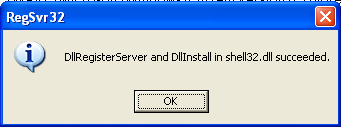
A confirmation message will appear like given below
2- Click Start –> Run –> regsvr32 /i shell32.dll
Wait for the confirmation and click OK.
Method 4:
If none of the above methods work, please download our Smart Virus Remover from here:
[download id=”6″]
Using this Virus Remover please restore your Windows settings and your show hidden files and folders will be set to default.
Please spare a few moments from your precious time and tell us about your experiences.
Comments
1,097 responses to “Show Hidden Files and Folders not working?”
Hello Sir
i used you all 3 method but problem is still there
Azhar if you’re unable to restore your settings, probably your system is still infected with a virus. Please scan your system with an online scanner and then try the fixes again. Most probably this will solve your problem.
great work……..
thanks alot
thanks alot!! it’s really help.
Is there not an older version which I could use?
I need to fix this problem ASAP!
The 2nd one solved my problem. Thanks a lot.
hi.. thanks a lot
you’ve solved my big problem!!
thank you very much!
great work……..
thanks alot
First 2 methods do not work.
Third method gives me “The Registry File Not Found. Download the Ravmon Removal Virus Tool again.”
The Smart Removal does not find any viruses. (However my antivirus quarantee a virus called trojan.ramag)
I guess I need some help here
Michael there was a bug in the Smart Virus remover which we have rectified. Please download the tool again and it’ll work fine without errors. Thanks.
Great………..support……i have solved my problem, by creating new value for CheckedValue……………thanks a lot guys
Thanks, Second method worked for me..
Thanx a mill for the help. Of toppic What is the best way to keep flash drives from being infected , autorun etc
Aardvark67, to avoid viruses and malware from my USB drives, I format my USB drives with NTFS file system and use the NTFS security permissions to my advantage. I make the drive read-only for everyone except for some folders where I can read and write my files. In this way, the USB drive remains safe from autorun and other viruses. Here is how you can convert your USB drive to NTFS format.
http://www.technize.com/2008/07/14/how-to-format-usb-drive-with-ntfs-file-system/
Awesome! Method 1 didnt work… But then i went to Method 2 and it worked like a charm. Thanks!
yes! ^^v method 2 work for me, thx for sharing
thens amigo
Man Your smart virus remover is a great software, it detected the virus immediately and removed it, now the problem is completely solved.
Though the 1st method also worked but it did not remove the virus but smart virus remover is just great. I recommend this software to all those who have this problem.
Cheers mate,
Thanks
Many a thanks,
Option 2 worked for me…
thankyou very much. it’s works
Awesome….
Good solutions…
Keep it up …
Hello sir,
From last few months i am facing the problem of not showing the hidden files and folder in my laptop and i m using windows XP service pack 3 and to solve that problem i have used your software named smart virus remover and all the other two steps to solve this problem by going in registry editor window and followed all the steps you told but still it is not showing the hidden files or folder command rightly. when i click the show hidden file command and again it sets to the don’t show the hidden files.so, can u give me the solution for this problem.i don’t want to see that problem again in my laptop, i like to remove it permanently.please reply me via e-mail to my e-mail address given.i will be thankful to you.
dude — you are really great. Creating new key worked. 🙂
Thanks for the help.. it worked perfectly =]
Tried all 3 options but the first 2 didn’t work. The Smart Virus Remover really did its job. This is great!
Thank you:)
thank you very much! the 2nd method worked out for me well! thanks thanks!
thanx for d wonderful help u provide…..
d solutions provided actually help us…keep providing d same in future tooo
u guys rock
special thanks to miss sonal jain
Thanks , The Second Method worked ,
I think it probably became a problem when I rtied setting the attributes of a file manually , to hidden through CMD.
DOesn’t sound possible , but thats what I had done.
Or is it definitely a virus.?
thanx for d help u provide…..
d solutions provided actually help us…keep providing d same in future tooo
1st method worked for me u guys rock
thanks a lot, mate it really worked, thanks from mexico
cooooooooooooooooooooooool program thanks a lot
The 2nd method fixed my problem about hidden files in my mp4 player. Thanks a lot!
Thanks a lot … Smart Anti virus worked..!!!
Hey it worked thanks a lot.
tnx so much… My show hidden files and folders is now working
Tnx it’s work perfect 😀
nice job with the hidden files registry, ty
Hi Friend,
Your exe worked fine for me………..
Thanks A lot.
Thanks
Pratap
Thanks a lot from kolkata…..
thanx a lot, i tried many times to bring back the show folder option, failed, but simply fixed the issue by ur virus remover. (by restoring the windows). g8 application, all the best.
Thank you this article helped me alot
nice job dude it really worked thanks a lot for sharing these. bye take care.
Hey man that program is great! i’ve been dealing with this probLem about 2 months… and now its finally done! Thanx to you! And onLy the hidden fiLes probLem but it fixed my MSN 9.0 probLem too 😛
gr8 dude… u rocks dis worked 4 me… thanks
Method 2 worked for me, thank you very much!!
Thank you very much. i manged to help my problem using the last two methods
please help me i have very important files in my USB (Removable disk/Flash disk). unfortunately, my folder files are missing. The folder files are still in the disk but i think it’s hidden. how can i view it again???please help me..
thanks you very much dear its working yah now i really enjoying thanks thanks………….
nice! thanks for this site it really help a lot,
Many many thanks.It worked fine while I did the following
Go to registry editor by running regedit in the run box.
Go to this key:
HKEY_CURRENT_USER\Software\Microsoft\
Windows\CurrentVersion\Explorer\Advanced
In the right hand area, double click hidden and change the value to 1.
Thank u very much….. Its working for me
thanx a lot man;method 2 works 4 me; thankx a lot again;hats off…
Thanks man…usually i never take out time to thank once a problem is fixed, but this is different..step 2 worked perfectly..u rock dude…cheerz…god bless..thanx again!