
A few days back, a client came to me and told me that he was having trouble with his Windows XP. The show hidden files and folders was not working at all. If he selected the radio button “Show hidden files and folders”, and then press Ok .. the changes would just disappear upon opening the dialog again. It was probably some virus attack after which the Windows registry was not being updated properly. So here is what I did to restore it back. There are so many methods to restore back the registry. If one method is not working, please try another one.
Method 1:
Go to registry editor by running regedit in the run box.
Go to this key:
HKEY_CURRENT_USERSoftwareMicrosoft
WindowsCurrentVersionExplorerAdvanced
In the right hand area, double click hidden and change the value to 1.
Now you’re all set to go. Check it in your tools menu if the changes have taken effect.
Method 2: (By Random Hajile)
1. Click “Start” -> “Run…” (or press Windows key + R)
2. Type “regedit” and click “Ok”.
3. Find the key: HKEY_LOCAL_MACHINESOFTWAREMicrosoftWindowsCurrentVersionExplorer
AdvancedFolderHiddenSHOWALL
4. Look at the “CheckedValue” key… This should be a DWORD key. If it isn’t, delete the key.
5. Create a new key called “CheckedValue” as a DWORD (hexadecimal) with a value of 1.
6. The “Show hidden files & folders” check box should now work normally. Enjoy! 
Method 3: (By Denny)
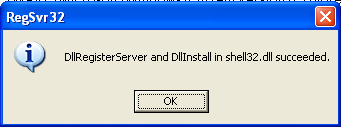
1- Click Start –> Run –> regsvr32 /i browseui.dll –> enter
A confirmation message will appear like given below
2- Click Start –> Run –> regsvr32 /i shell32.dll
Wait for the confirmation and click OK.
Method 4:
If none of the above methods work, please download our Smart Virus Remover from here:
[download id=”6″]
Using this Virus Remover please restore your Windows settings and your show hidden files and folders will be set to default.
Please spare a few moments from your precious time and tell us about your experiences.
Comments
1,097 responses to “Show Hidden Files and Folders not working?”
Stumbled upon this page a while ago and tried the Smart Virus Remover tool. It helped me restore Windows’ default settings and and I was able to track and delete those nasty worms such as AntiVir.exe.
Thanks a lot for this article!
Method 1 did not work as the hidden value kept defaulting back to 2. Method 3 resolved the issue. Many thanks.
Hello Sanix,
Thanx dear, I was facing this problem from last one week but i was ignoring it.. today i thought i should find out the reason that why is it happening? and got your article your first method worked for me.. thank you very much again…
thanks, got the hidden files and folder back thru method 2, was removed by some trojan…
This is a responce to ‘629 Responses to “Show Hidden Files and Folders not working?”’ article.
The registry tweaks did not work in my case because my computer was infected with a virus/trojan.Though I have updated ad-aware and eset nod32 on my machine.
I also tried many other solutions on the web to no avail.
However after runinig Smart virus remover provided on your site,the problem was solved.It even managed to find other viruses as well.
You have been of great help and you should be proud of your services.
Eric
thanks fellas…..method 2 works for me….
it works with method 2. thanx a lot 🙂
I could see my files only through a network before. Now it’s ok. Method 2 works…
thanx hidden files aab visible hain
I downloaded the anti virus program…It worked..
Thanks..
Thanks! The second solution works for me.
thanks a lot sir
great software
greaaaaaaaaaaaaaaat
tnx alot
hi this is ajay
and i have to say
it work very well manner and it solve my problem thanks best of luck keep going.
I tried the first method, it doesn’t work at all. After i tried the second method…yes it work now…thank you very much 😉
thank you dude. 😉
Thanks Man. . 😉 u rocks 😉
can any body help please i have this problem on my laptop about hidden when i type regedit on run and press ok i get the messege registry editting has been disabled by your administrator
please help me
because am the admin
virus is remote.inf
hey
Hey, thanks a tonne Sanix….
it works now…
Regards
hi..thanxx buddy..u just helped me out.
thanx..
i liked ur wayy., i think u shuld be a comp. engineer..
am i rightt??
hey i just do all the procedure but it cann’t delete “CheckedValue”,it appears every time and change its value “0” autometically.so what to do plz repl.
Hey, thanks, the second solution worked perfect ! And I found the reason for me, mtoja.dll file in Windows/System32 folder …. it was hiding all along, my antivirus was detecting it but was unable to delete it, — the unhide problem started the same time as the virus was detected and I couldn’t delete it coz it was hidden. Once unhidden, I was able to remove it easily !!
hei, can u rezolv me ?
i have the same problem, but a little difference that CheckedValue at my computer is not DWORD it is REG_SZ. what cand i do ? i delete it but when i create a DWORD and i try to rename the new value into CheckedValue it tells me there is already a value named CheckedValue . PLEASE HELP ME !!!
Thanks alot to providing such type of valuable inforamtion, my matter have solved with method 2.
Thanks alot again.
ya its works like a charm….!!
Thanx.
Method 2 worked just perfect, thanx man 😉
Cheers !
Thanx very much, method 2 works great for me:)))
Click on Start menu, then click Run (or Windows key + R).
Type cmd, a command prompt window (DOS) will open.
Type regsvr32 /i browseui.dll then press the Enter key, wait for a confirmation window.
Type regsvr32 /i shell32.dll then press the Enter key, wait for a confirmation window.
Close the command prompt.
Method 1 & 2 totally failed but after I download the Smart Virus Remover and run it then the hidden files are shown. Many thanks.
Heru
all 3 methods failed. 🙁
Thanks.Method 1 did not work but method 2 worked. Can’t install Smart Virus remover.
Hi, the first method only made both check ratio button in the folder options window from explorer tool menu to go blank.
The second option, I don´t even have that key! :-S
The third option, the ´virus remover´ just behaves exactly like a malware virus script. It doesn´t run and shows the message error ´too big to put in memory´ even though the file is around 500kb, and my other programs runs just fine. I hope it is not one of these software traps, like other ´solutions´ I´ve tried.
I´m running an original windows XP License with SP3, fully updated.
I tried the first three methods and all failed. I’m running the same config and Jose and got exactly the same result running the virus scanner.
DENNY’S SOLUTION using the regsvr32 DID WORK however.
Thanks Denny!!!!
ONE MORE SOLUTION
hi guys this problem struck me just before when i was about to sleep i tried this first tweak i.e
Go to registry editor by running regedit in the run box.
Go to this key:
HKEY_CURRENT_USER\Software\Microsoft\
Windows\CurrentVersion\Explorer\Advanced
In the right hand area, double click hidden and change the value to 1.
but it didnt worked
but just below hidden i found HideFileExt and below this i found HideIcons NOW you should change its hexadesimal value to 1 and see the magic your hidden folders are back to there loww visiblity state
ohhhhhhhhhh now i can sleep peacefully
FORGOT to say one thing if u touch that folder options show hidden files and folders again it will change the values of hidden(HKEY_CURRENT_USER\Software\Microsoft\
Windows\CurrentVersion\Explorer\Advanced) to zero again so better leave it untouched and get ur files to safe place n the tweak with this problem and if u find any solution dont forget to tell me from my side goodnight
thank u sooo much… it worked perfectly well…:)
thccccccccc alot man it works very good
method 2 is perfect .
can u explain what i had done to make show hidden files works normal
ineed to understand these steps and evreything i done
plz email me
thccccccccc alot man it works very good
method 2 is perfect .
can u explain what i had done to make show hidden files works normal
ineed to understand these steps and evreything i done
plz email me at sherief_omar2001@hotmail.com
thanks a lot!
method 2 worked for me :]
For the first time i m commenting on an article coz it is the article that i wanted for so long
thanku very much
it has solved my problem in few seconds
A million thanks to you man! In my case, first option scores!!!
Try Denny methods
type regsvr32/i browseui.dll
and regsvr32/i shell32.dll
awesome!!!
you guys are a big help
Method 2 works. i highly recommend it
tnx a lot!
hey there i tryed all ur Method and non of them worked with me + the Smart Virus Remover is not working every time i wanna run it do nth
THANK YOU
2 METHOD WORKED
I’ve had to fix several machines now and Denny’s method (13/7/2009) is easy, clean, safe and worked every time. Is there anyway of adding it to the recommended solutions.
THanks Denny
OMG !!!
Method 1 , fail….
Method 2 : Perfect !!!
After soooo long without seeing my hidden and system files … 😀
Thankx a lot !!!